100% FREE ONLINE DATING
sponsored links
| Topic: MORE HELP NEEDED,PLEASE | |
|---|---|

|
|
|
Bare with me as I try to tell you. I'm not sure what I did wrong. I wanted to make the words bigger because I couldn't see them very well. I was told to go to FRONT OR FONT. What I've is a black screen with white,green and blue words. How do I get it back to just a white with black letters??
|
|
|
|
|

|
|
|
sounds kinda Christmasy to me

|
|
|
|
|

|
|
|
Bare with me as I try to tell you. I'm not sure what I did wrong. I wanted to make the words bigger because I couldn't see them very well. I was told to go to FRONT OR FONT. What I've is a black screen with white,green and blue words. How do I get it back to just a white with black letters?? uhm, what are you talking about? |
|
|
|
|

|
|
|
Is this on window or a web site? Is it xp or vista?
|
|
|
|
|

|
|
|
Try to reboot : many problems will be fixed by rebooting .
|
|
|
|
|

|
|
|
Get a Mac.

|
|
|
|
|

|
|
|
Bare with me as I try to tell you. I'm not sure what I did wrong. I wanted to make the words bigger because I couldn't see them very well. I was told to go to FRONT OR FONT. What I've is a black screen with white,green and blue words. How do I get it back to just a white with black letters?? Does that happen on a specific program (which one)? Where did you go to change your font settings? Does it happen everywhere? Does it do that from the beginning (as soon as you boot)? More information would be helpful. |
|
|
|
|

|
|
|
Hello,
It sounds like you went into the "Display Properties" "Right Click" on open area of desktop. Select "Properties" Left Click on the "Appearance" Tab I have Win XP...Here's my settings Under "Windows and Buttons i have "Windows XP Style selected. Under "Color Scheme" i have "Default (blue) Under "Font Size i have "Normal" selected Hope this helps. Bob Out |
|
|
|
|
|
|
|
|
to enlarge your text outside of a word program you use Ctrl and your mouse wheel(up to increase down to decrease ) while your curser is hovering over the page .
in a program such as microsoft word , Font is the type of lettering to be used , you can also adjust text sizes and colors using the same dropdown box " Font " |
|
|
|
|

|
Edited by
leadsalad
on
Wed 10/14/09 06:04 PM
|
|
sounds like you turned on the high contrast mode in accessibility options.
go to control panel -> accessibility options and under the display tab see if 'high contrast' is selected. either that or you were messing with the color scheme and fonts in the display properties under the appearance tab as stated earlier. |
|
|
|
|

|
|
|
Bare with me as I try to tell you. I'm not sure what I did wrong. I wanted to make the words bigger because I couldn't see them very well. I was told to go to FRONT OR FONT. What I've is a black screen with white,green and blue words. How do I get it back to just a white with black letters?? With your mouse, press the right button anywhere on your Desktop. It will appear like this (pic below) 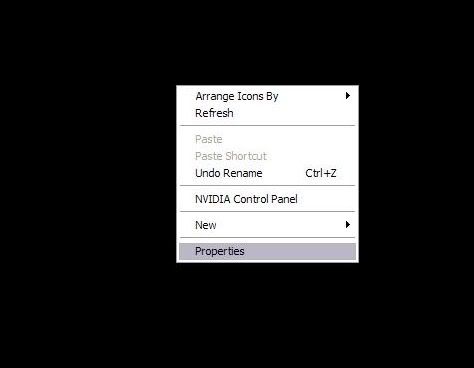
click PROPERTIES. Another window will come out and it will appear as (pic below) 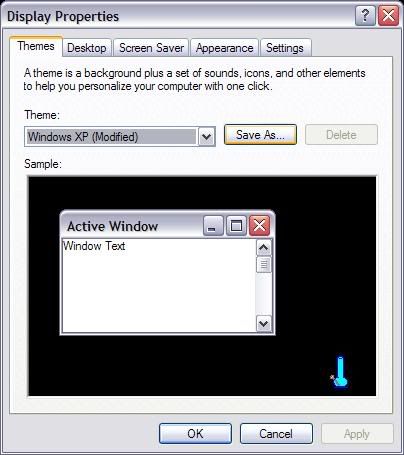
This is how the default of most Windows XP be. On top of this window, click Appearance 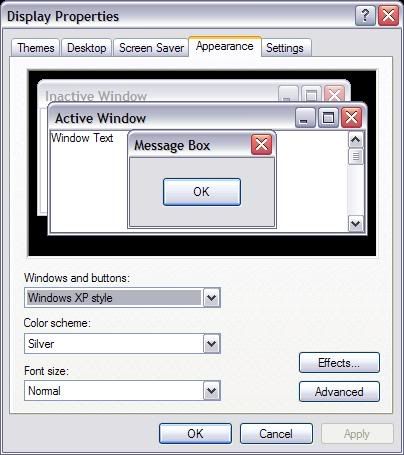
it will look like this (pic above) now just below where it says FONT SIZE (pic below) 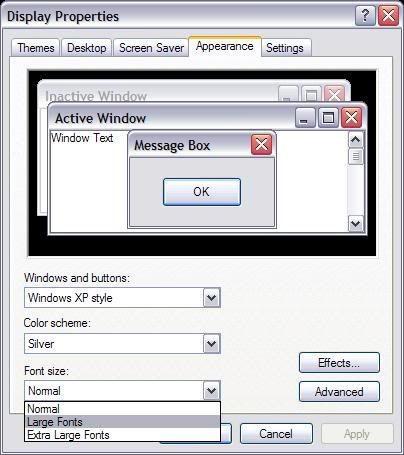
click the size you want, when you're done click APPLY, then click OK. |
|
|
|
|
|
|
|
|
THANKS AGAIN, KEEP YOUR FINGERS CROSS,FOR THAT I WON'T MESS IT UP. COMPUTERS AND I DON'T GET ALONG...
|
|
|
|
|